Access Control
Node Introduction
This node is used to set the access permissions for a menu. By default, it is set to OWNER, meaning only the creator can access it.
Inputs
- MenuItem - Menu item.
Outputs
- None
Node Properties
- MenuPrompt - Menu prompt. This parameter is used to set the prompt message for the access control menu.
- DefaultMode - Default permission. This parameter is used to set the default permission. You can choose from the following four permissions:
- OWNER - Only the owner can access.
- PUBLIC - Anyone can access.
- GROUP - Only group members can access.
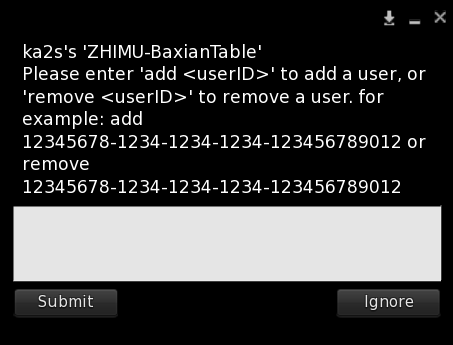
- LIST - Custom access list. The owner can add or remove UUIDs of individuals to control access permissions.
- AccessKeys - Access list, only effective in LIST mode. This parameter is used to set the list of UUIDs for individuals who can access the menu. Only individuals in this list can access the menu. Input UUIDs directly, separating multiple UUIDs with commas. Example:
6dc23e7a-6071-faa5-28cf-489503525461, 2f56d235-d24b-ada1-d23c-9551a5f810b7
- AccessKeys - Access list, only effective in LIST mode. This parameter is used to set the list of UUIDs for individuals who can access the menu. Only individuals in this list can access the menu. Input UUIDs directly, separating multiple UUIDs with commas. Example:
Effect
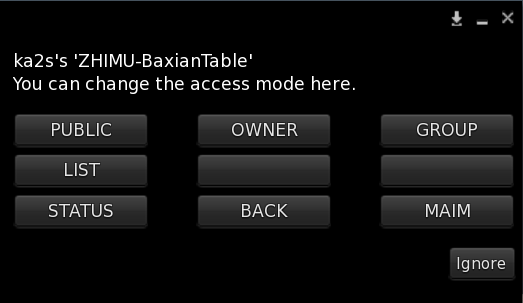
Click on the menu item to select the corresponding mode.
If LIST mode is selected, an input box will pop up, allowing you to add or remove UUIDs. To add a UUID, input add [UUID], and to remove a UUID, input remove [UUID]. For example: add 12345678-1234-1234-1234-123456789012, remove 12345678-1234-1234-1234-123456789012.