Parameter Collector
Purpose
The scripts in this directory are used to collect non-PBR texture parameters of a model, working in conjunction with EZMenu to enable texture switching functionality.
By running these scripts, you can quickly obtain the current texture settings of your model. These parameters can then be pasted into the Parameters field of EZMenu’s non-pbr/SetTextureAdv feature, allowing you to save the settings. Once the script is generated, simply click the corresponding menu item to restore the model’s textures to the saved parameter state.
Usage Instructions
Prerequisite: Create PrimTag for Each Link Prim
Before running the parameter collection script, ensure that each linked prim (link prim) has a name starting with ez: and ending with ; in its description field, e.g., ez:dengxin;.
Why is this necessary? The script uses this name to identify each linked object and collect its texture parameters. Without proper naming, the script cannot correctly identify objects, leading to collection failure.
You can use the 1.AutoPrimTag script in the script folder to automatically add PrimTags to each linked object.
Parameter Collection
The parameter collection script is located in the 2.Parameter Collector (For Non-PBR) directory. Place this script into your model and click the model to automatically collect its texture parameters. After collection, the script will output the collected parameters in the Nearby Chat. Copy these parameters into the Parameters field of EZMenu’s SetTextureAdv node to complete the configuration.
By default, the script collects the following parameters:
- Diffuse
- Normal
- Specular
- Glow
- Full Bright
- Tint Color
If a face does not need to be collected, set its Diffuse texture to Default or Blank, and the script will skip collecting that face.
Parameters Directory
If you only need to collect specific parameters, you can find the corresponding standalone scripts in the Parameters directory. Place these scripts alongside ParameterCollector in your model to collect only the parameters you need.
Using the Parameters
After collecting the parameters, the script will output them in the Nearby Chat, starting with ==== Parameters Begin ==== and ending with ==== Parameters End ====. Copy these parameters into the Parameters field of EZMenu’s SetTextureAdv node to complete the configuration.
The parameters you obtain should look like this:
==== Parameters Begin ====#t|1|0|<1.0, 1.0, 1.0>|1.0;t|1|1|<1.0, 1.0, 1.0>|1.0;t|1|2|<1.0, 1.0, 1.0>|1.0;t|1|3|<1.0, 1.0, 1.0>|1.0;t|1|4|<1.0, 1.0, 1.0>|1.0;t|1|5|<1.0, 1.0, 1.0>|1.0;t|1|6|<1.0, 1.0, 1.0>|1.0;t|1|7|<1.0, 1.0, 1.0>|1.0#t|2|0|<1.0, 1.0, 1.0>|1.0#t|3|0|<1.0, 1.0, 1.0>|1.0;t|3|1|<1.0, 1.0, 1.0>|1.0;t|3|2|<1.0, 1.0, 1.0>|1.0;t|3|3|<1.0, 1.0, 1.0>|1.0;t|3|5|<1.0, 1.0, 1.0>|1.0#t|4|0|<1.0, 1.0, 1.0>|1.0#t|5|0|<1.0, 1.0, 1.0>|1.0==== Parameters End ====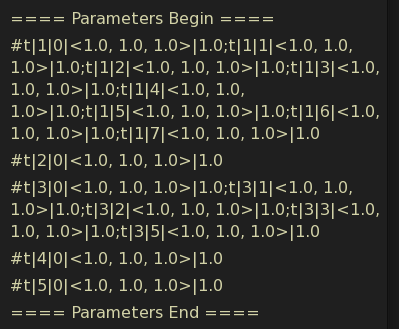
If your parameters are not in this format and each line does not start with # but includes timestamps and names, like this:
[04:47] YUSR-Hexagonal wooden palace lantern-01: #d|0|0|a7b3c9d2e4f5g6h7i8j9k0l1m2n3o4p|<1.0, 1.0, 0.0>|ZV|0.0;d|0|1|q1w2e3r4t5y6u7i8o9p0a1s2d3f|<1.0, 1.0, 0.0>|ZV|0.0;d|0|2|z9x8c7v6b5n4m3l2k1j0h9g8f7|<1.0, 1.0, 0.0>|ZV|0.0[04:47] YUSR-Hexagonal wooden palace lantern-01: #n|0|0|p0o9i8u7y6t5r4e3w2q1a2s3d4f|<1.0, 1.0, 0.0>|ZV|0.0;n|0|1|g5h6j7k8l9m0n1b2v3c4x5z6a7|<1.0, 1.0, 0.0>|ZV|0.0;n|0|2|NK|<1.0, 1.0, 0.0>|ZV|0.0[04:47] YUSR-Hexagonal wooden palace lantern-01: #s|0|0|m8n9b0v1c2x3z4a5s6d7f8g9h0|<1.0, 1.0, 0.0>|ZV|0.0|<1.0, 1.0, 1.0>|51|0;s|0|1|j1k2l3m4n5b6v7c8x9z0a1s2|<1.0, 1.0, 0.0>|ZV|0.0|<1.0, 1.0, 1.0>|51|0;s|0|2|NK|<1.0, 1.0, 0.0>|ZV|0.0|<1.0, 1.0, 1.0>|51|0[04:47] YUSR-Hexagonal wooden palace lantern-01: #g|0|0|0.0;g|0|1|0.0;g|0|2|0.0[04:47] YUSR-Hexagonal wooden palace lantern-01: #f|0|0|0;f|0|1|0;f|0|2|0[04:47] YUSR-Hexagonal wooden palace lantern-01: #t|0|0|<1.0, 1.0, 1.0>|1.0;t|0|1|<1.0, 1.0, 1.0>|1.0;t|0|2|<1.0, 0.9, 0.8>|0.7You need to change the chat log style in FireStorm settings (if you’re using FireStorm).
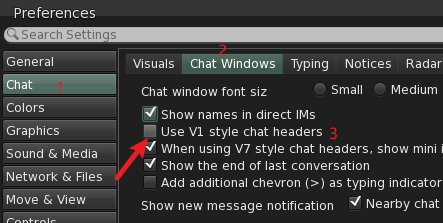
Use V1 style chat headers option.
Otherwise, the collected parameters will include timestamps and model names, making them unreadable.
Using EZMenu
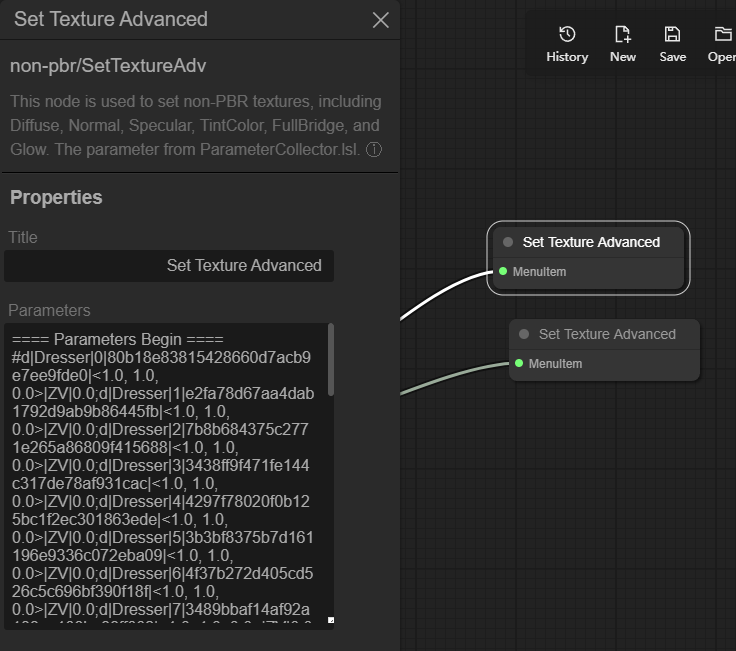
Place EZMenu’s SetTextureAdv node into your model and paste the collected parameters into the Parameters field.
Notes
- PrimTag Priority: Ensure that PrimTags are assigned to link prims before running the parameter collection script. Modifying PrimTags after collecting parameters may prevent correct parameter mapping and functionality.
- Compatibility: The script is designed to account for other information in the description field and will not conflict with other scripts that use the description attribute.